What is the Harvard resume format?
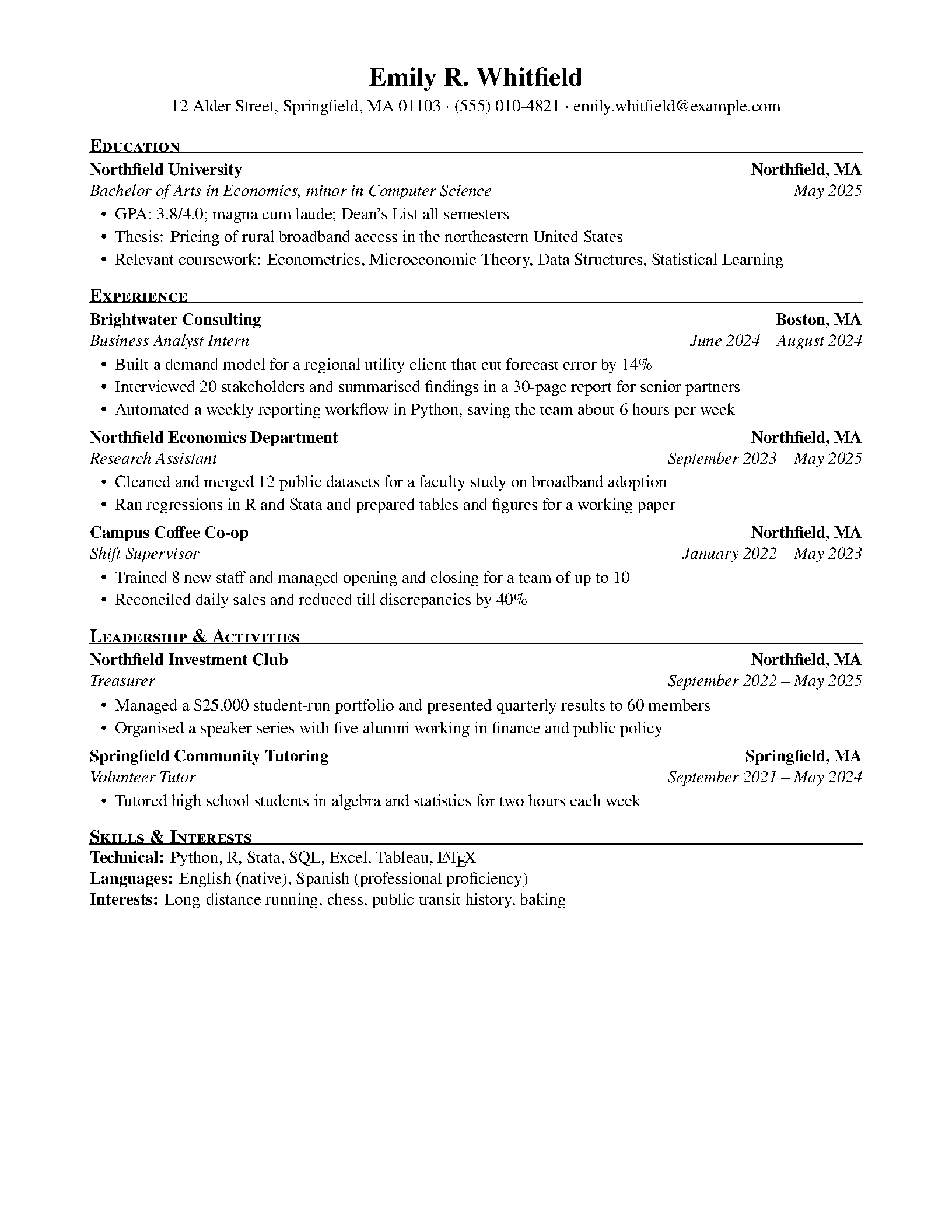
The “Harvard resume” is a plain, conservative resume layout popularised by university career offices. It is one page, one column and set in a Times-like serif font. Your name is centred at the top with a single contact line, and each section has a bold heading with a rule under it.
This is an independent template that follows that layout. It is not affiliated with Harvard University and does not use Harvard logos or claim endorsement.
Sections run in a fixed order: Education first, then Experience, Leadership & Activities, and Skills & Interests. Each entry has the organisation in bold on the left with its location on the right, then your role in italics with the dates on the right, followed by bullet points.
Who it suits
- Students and recent graduates, where education leads the page.
- Applicants to consulting, finance, law and other fields that expect a traditional resume.
- Anyone applying through an applicant tracking system (ATS), since the file is plain text with no icons or columns.
If you want a more technical, project-led layout, see Jake’s Resume.
How to edit it
Everything lives in main.tex. Replace the name and contact line in the center block, then edit the entries. Three commands keep the layout consistent:
\eduentry{Northfield University}{Northfield, MA}
  {Bachelor of Arts in Economics}{May 2025}

\entry{Brightwater Consulting}{Boston, MA}
  {Business Analyst Intern}{June 2024 -- August 2024}
\begin{itemize}
  \item Built a demand model that cut forecast error by 14\%
\end{itemize}

\skillline{Technical}{Python, R, SQL, Excel}
\entry and \eduentry take organisation, location, role and dates, in that order. \skillline takes a bold label and a comma-separated list. To add a section, copy a \section{...} heading and its entries.
Tips
- Keep it to one page. Remove bullets before touching the margins.
- Start each bullet with a verb and include a number where you honestly can.
- Use consistent date formats and list entries newest first.
- Leave out photos, ratings bars and objective statements; they add nothing and can confuse parsers.
- Save the PDF with a clear file name such as
Whitfield-Resume.pdf.